
The Blog

How to Edit Travel Videos (Without Losing Your Mind or Your Story)

If you’ve ever returned from a trip feeling smugly proud of your camera roll, only to be crushed by the realisation that you now have six hours of footage, zero plan, and a creeping sense of dread, welcome. You are among friends.
Learning how to edit travel videos isn’t about becoming a filmmaker. It’s about turning moments into memories people actually want to watch, including future you, who will one day stumble across that video at 2am and think, Oh wow, I really lived.
Whether you’re editing travel videos for Instagram, TikTok, or YouTube, the principles are the same. The platforms change, the trends change, but storytelling doesn’t. And the good news? You don’t need fancy gear, endless time, or a degree in post-production to do it well. Along the way, I’ll also share the editing tools I actually use on the road, including simple, intuitive software like Clipify, and how I keep my workflow realistic when I’d rather be exploring than staring at a timeline.
This is the real, practical guide to editing travel videos, written by someone who’d rather be outside exploring than staring at a timeline for twelve hours straight.

Disclaimer: All of my posts could contain affiliate links. This means that if you click on the link and make a purchase I would receive a small commission at no extra cost to you. This commission is what covers the costs of the website and allows me to continue creating content to help people like you travel!
What's in this post:
Start Here: Decide What This Video Is Actually About
Before you open any editing software, pause. This step alone will save you hours.
The biggest mistake people make when learning how to edit travel videos is assuming the story will magically appear once everything is on the timeline. It won’t. That’s how you end up with a beautifully shot, emotionally hollow montage of stuff that happened.
Ask yourself one simple question:
What do I want someone to feel when they finish watching this?
Not what you did. Not where you went. The feeling.
- Awe
- Chaos
- Calm
- Discomfort
- Wonder
- “Why would anyone do this voluntarily?”
Choose one. One feeling per video. That’s it.
If your trip included sunsets, street food, missed buses, emotional breakthroughs, bad decisions, and a suspiciously warm beer, congratulations, that’s life. But it’s not one video. It’s several.
Editing becomes infinitely easier when you know what you’re saying.

How to Edit Travel Videos for Different Platforms (Without Re-Editing Everything)
Let’s clear something up early: the reason your YouTube video flops on TikTok is not because “the algorithm hates you.” It’s because each platform rewards different types of storytelling.
Instagram Reels
Instagram is about impact, not context.
- Hook fast (the first 2 seconds matter more than the last 20)
- Strong visuals
- Emotional pull
- Captions do half the storytelling
You’re not explaining the trip. You’re making someone stop scrolling mid-existential crisis.

TikTok
TikTok is where messiness thrives.
- Voiceovers work brilliantly
- Behind-the-scenes chaos beats polish
- Personality > perfection
If Instagram wants a postcard, TikTok wants a diary entry written on a bus that’s definitely going to break down.
YouTube
YouTube is where you slow things down.
- Clear structure
- Space to breathe
- A beginning, middle, and end
This is where stories unfold rather than explode.
Good editing doesn’t mean re-editing everything. It means creating a strong master edit and adapting it thoughtfully.

The Editing Tools I Actually Use (and Why Simpler Usually Wins)
Here’s the truth most tutorials won’t tell you: the best video editing software is the one you’ll actually use.
When you’re travelling, your time is limited. Your patience is thinner than your mobile data allowance. You don’t need software that does everything. You need software that lets you tell a story and move on with your life.
There are plenty of popular video editing programs out there:
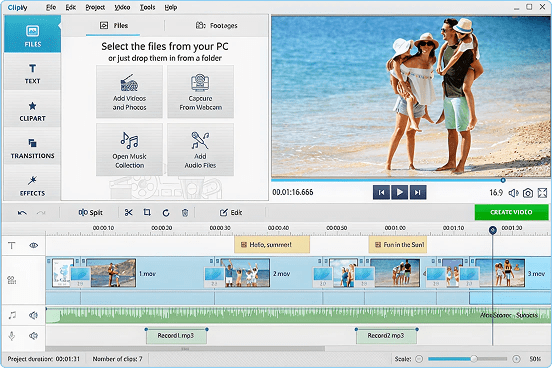
- Clipify – This is my go-to for most travel edits. It’s intuitive, fast, and doesn’t demand that you sacrifice a weekend to learn it. When I just want to edit, export, and get back to travelling, this is what I reach for.
- CapCut – Great for trends, not always great for nuance
- Adobe Premiere Pro – Powerful, but time-hungry and occasionally soul-destroying
- Final Cut Pro – Excellent if you’re deeply embedded in Apple’s ecosystem
For most travellers learning how to edit travel videos, simplicity wins. Editing should support your creativity, not exhaust it.
How to Edit Travel Videos When You’ve Filmed Far Too Much
Ah yes. The classic problem.
You don’t need all of it. I promise.
Here’s a rule I live by: one strong clip per moment beats five mediocre ones.
Try this process:
- Watch everything once (painful, but necessary)
- Flag only the clips that make you feel something
- Delete aggressively
That shaky clip you almost binned? Often gold.
That perfectly framed shot you’re emotionally detached from? Probably dead weight.
Editing is less about addition and more about courage.

Sound: The Secret Weapon Everyone Ignores
If you want to dramatically improve how you edit travel videos, stop obsessing over visuals and start caring about sound.
Sound does the emotional heavy lifting.
- Ambient noise grounds a scene
- Music creates momentum
- Voiceovers add meaning
A simple voiceover explaining why a moment mattered can elevate even the most average footage. You don’t need studio quality. You need honesty.
And yes, subtitles matter. People scroll silently. Adapt accordingly.
Colour, Filters & Why “Cinematic” Is Often Overrated
Let’s talk about colour grading, and why it’s so often abused.
Travel videos don’t need to look like a Netflix documentary. They need to look believable.
Consistency matters more than drama. Match clips. Balance exposure. Don’t drown everything in teal and orange just because someone on YouTube told you to.
If the place was bright, let it be bright.
If it was moody, let it be moody.
Editing should enhance reality, not replace it.

How Long Should Editing Take? (Be Honest)
If editing takes so long that you stop travelling, something has gone wrong.
As a rough guide:
- Short social video: 30–90 minutes
- Longer YouTube video: a few focused sessions
If you’re spending days tweaking transitions no one will notice, you’re not editing, you’re procrastinating.
Good enough is often perfect.
A Simple Travel Video Editing Workflow (Steal This)
Here’s the system I use:
- Import footage
- Rough cut (no polishing yet)
- Story pass (remove anything that doesn’t serve the feeling)
- Add sound and captions
- Export and move on
This approach works whether you’re editing on a laptop in a hotel room or at home pretending you’ll “do it properly later.”

Common Travel Video Editing Mistakes (That I’ve Definitely Made)
- Over-editing everything
- Forgetting subtitles
- Using trending audio with zero relevance
- Editing to impress other creators instead of actual humans
Your audience doesn’t care how clever your transitions are. They care how your video makes them feel.
How to Edit Travel Videos When You’re Tired, Busy, or Over It
Because let’s be honest… this is most of the time.
Lower the bar. Tell one small story. Use tools that don’t fight you. Finish the edit.
This is exactly why I default to Clipify when I’m editing on the road or running on empty. When your brain is fried and your patience is low, the last thing you need is software that makes you feel stupid for not remembering a shortcut you learned once in 2021. I want to open the editor, cut the story, add sound, export, and be done, not disappear down a technical rabbit hole when the whole point of travel is to be out living it.
Momentum beats perfection every time.

Final Thought: How to Edit Travel Videos People Actually Want to Watch
Learning how to edit travel videos isn’t about software mastery or cinematic ambition. It’s about storytelling. It’s about deciding what matters and letting go of the rest.
You don’t need better gear. You don’t need more footage. You need clarity, intention, and a workflow that fits your life, not the other way around.
Edit simply. Edit honestly. And then close your laptop and go live the next story.
Because the best travel videos always start with choosing the adventure first.

Comments will load here
Be the first to comment